Similar Products









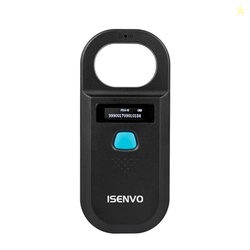
RFID Reader Operation Manual1. Press the pet microchip to start the device, enter the scanning mode, and start scanning the pet in the injection microchip scanner.2. Tags are scanned, the reader will enter the standby state. 3. Place a tag in the antenna loop and press the button to read. 4. Press the button to read the next label. 5. If no label is scanned, the device will automatically turn off after 180 seconds, or you can press and hold the button for 3 seconds to turn off the device..Backlight ScreenThe handheld reader has backlight screen makes it convenient for you to read.The history data can be read in the internal reading mode.The history data can be read in the internal reading mode..NOTEThe reader CAN NOT read Avid chips. The 9-digit ID cannot be recognized. Only the 15-digit international standard protocol can be recognized.
Sometimes you may see variation in product price due to “different seller” or “offer ended”.
Product prices and availability are accurate as of the date/time indicated above and are subject to change. Any price and availability information displayed on the Merchant’s Site at the time of purchase will apply to the purchase of this product..
deonus.com has no control over and makes no warranty or guarantee regarding the quality, usability, safety, morality or legality of any aspect of the items listed, the truth or accuracy of the listings or the ability of sellers to sell items or honor their coupon or promotion..
Coupons and Deals are valid at the time of posting and it may expire anytime.
We may get a commission if you purchase this Product from the Seller. But It does not add any additional cost to the buyer while buying products.
deonus.com is a participant in the Amazon Services LLC Associates Program, an affiliate advertising program designed to provide a means for website owners to earn fees by linking to Amazon.com .